In short
- Open your competition from ‘Competitions’ and choose ‘Standings’ (‘Ranking’ in Formula One).
- Your own row is marked ‘You’; open a stage, weekend or phase to see where your points came from.
- After a race Sporila first processes the result; until then your score may not change.
The screenshots show a fictional cycling competition with invented participants and riders. Names, points, sections and navigation can differ by sport and competition. Follow your own competition’s published results and rules.
Open the correct competition
Sign in and choose ‘Competitions’ at the top. Under ‘My competitions’, open the competition you want to follow. Depending on the sport, you may find sections such as ‘Standings’, ‘Results’ or ‘Stage standings’. If they are not available yet, no result may have been published or this game may use a different layout.

View the standings
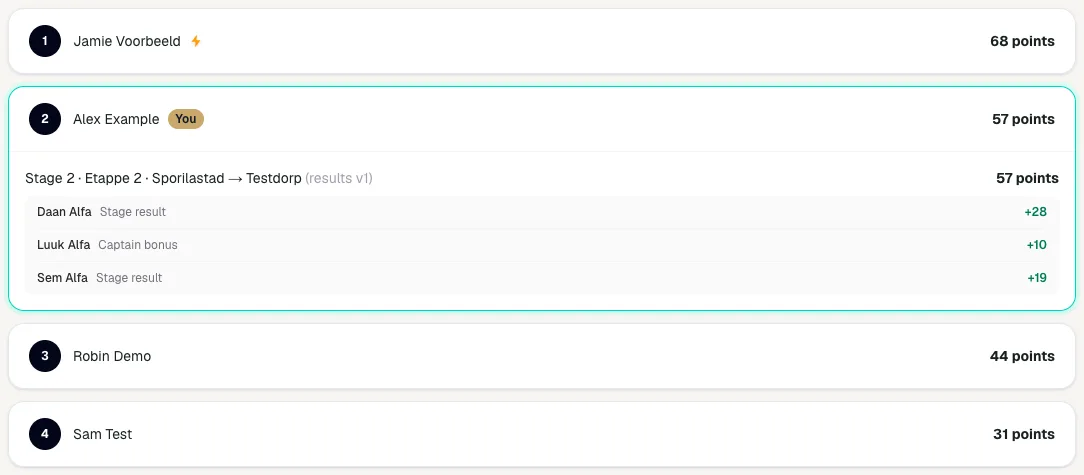
Open ‘Standings’ (‘Ranking’ in Formula One) to see each rank, participant and total score. Your own row is marked ‘You’. In cycling, a lightning bolt after a name means that participant won a stage. If you are also in a sub-standing your organizer created, tabs appear above the standings: ‘Overall’ for everyone and your sub-standing’s name for just that group. Equal points may produce a shared position or be ordered using an additional tie-break rule from the game rules. Any prize amount, if applicable, is only final when the competition has finished.
Follow your progress per round
Open ‘My season’ to see how your season went. In cycling, Formula One and football it is in the competition navigation; in speed skating and swimming it sits beside ‘Rules’ at the top of the competition. You see your rank and how many places you rose or fell since the previous round, your points, your best round and your gap to or lead over the leader. A round is a stage, a race weekend, a World Cup meeting, a final or a matchday. The charts show your rank per round and your points against the best score and, from three teams, the field average. You only see your own line; other participants are not named, apart from the leader, who is in the standings too.
See where your points came from
In cycling, your own row shows a breakdown per stage. Tap a stage to see, per rider, which points counted: stage points, captain bonus or malus. In Formula One and football you can open every participant for the points per race weekend or Phase; in speed skating and swimming everyone’s breakdown is visible once the deadline has passed. ‘(results v1)’ after a stage is the result’s version; after a correction it becomes v2. The sporting result and your fantasy score are different: Sporila first applies your competition’s scoring rules.
View a stage result
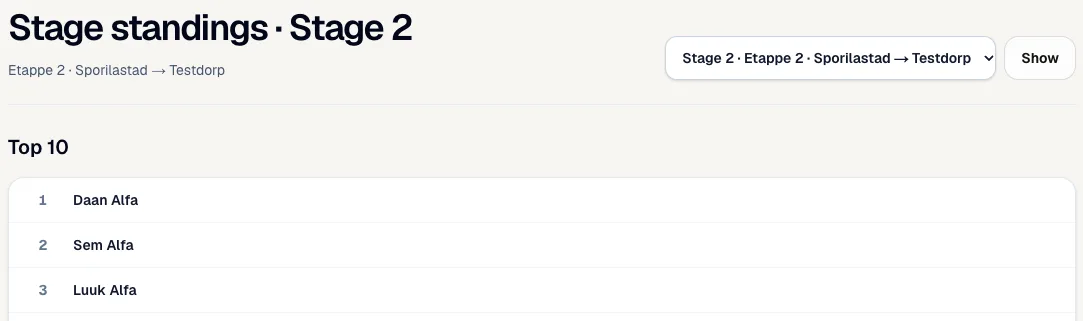
In cycling, open ‘Stage standings’ and choose a stage at the top right. The top shows that stage’s official top 10, with the riders who abandoned below it. Other sports have a similar view per event, race weekend or match day.
Read every participant’s stage score
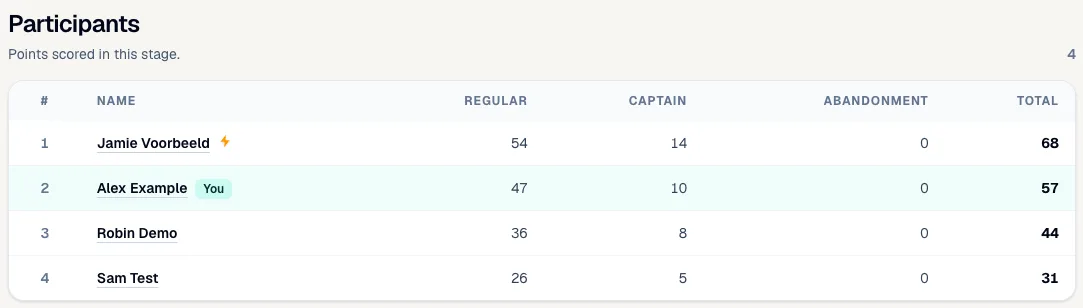
‘Participants’ shows what everyone scored in that stage. ‘Regular’ is all stage points of your riders, including your Bonus and Malus rider. ‘Captain’ is your captains’ extra bonus. ‘Abandonment’ is the penalty when your Malus rider abandons. Use the stage score to explain a change in the overall standings.
Wait for the result to be processed
An event may have finished while your points are not visible yet. First the official sporting result is published in Sporila; Sporila then processes it using the game rules. Your organizer does not do this themselves. Until then, your score may remain zero and the standings may not change. In speed skating or swimming, ‘Provisional standings’ means one or more results may still change. Submit your team or predictions on time: a draft or late entry does not score.
Allow for corrections
A result can be corrected, for example after an official classification changes. The stage then shows a higher version number, such as v2. Sporila then recalculates the relevant scores. Your points, event position and overall rank may therefore change. If in doubt, compare the newest published result with the score breakdown. Contact the organizer if they still do not match the published game rules after processing.
Ready to follow your score?
Open your competition and choose ‘Standings’. Then check the result and your score breakdown if you want to understand how the total was built.
Go to my competitionsHaving trouble?
My points are still zero
First check that your entry was final and that the result has been published and processed. A score is not always available immediately after an event.
I am not in the standings
Check that you signed in with the correct account, joined this competition and submitted a valid entry. Ask the organizer to check if all three are correct.
My points differ from the sporting result
The sporting result is converted using your competition’s scoring rules. Captains, predictions, Bonus, Malus, substitutes or other game sections can raise or lower your fantasy score.
My score changed later
A corrected result or reprocessed score can change your points and position. Check the newest result and any notice that the standings are provisional.
I cannot open another participant’s choices
Choices may remain hidden until a deadline. Some game formats show them afterwards through the participant’s name in the standings; others only show the score.
The standings and stage score do not seem equal
The event view covers one match or stage. The standings add all processed parts of the competition and may also include predictions or other bonuses.
Next guide: Insights after the deadline: other teams, most picked and optimal team