In short
- ‘Support’ appears at the top once you manage an organization; otherwise e-mail support@sporila.com.
- Choose ‘Support’, pick your organization and a category, and describe your question.
- You get no e-mail when someone replies: check Support yourself, especially at ‘Waiting for requester’.
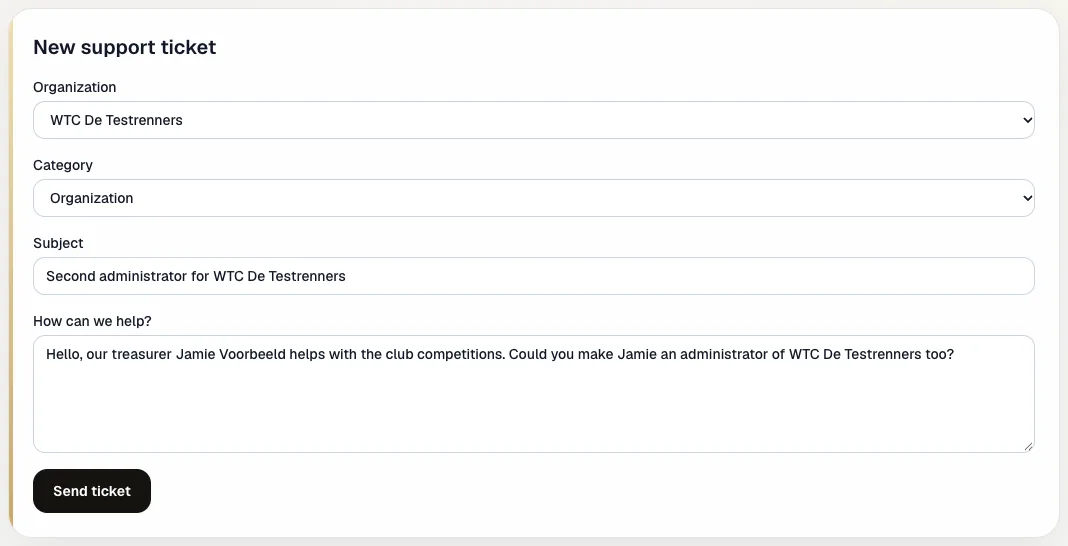
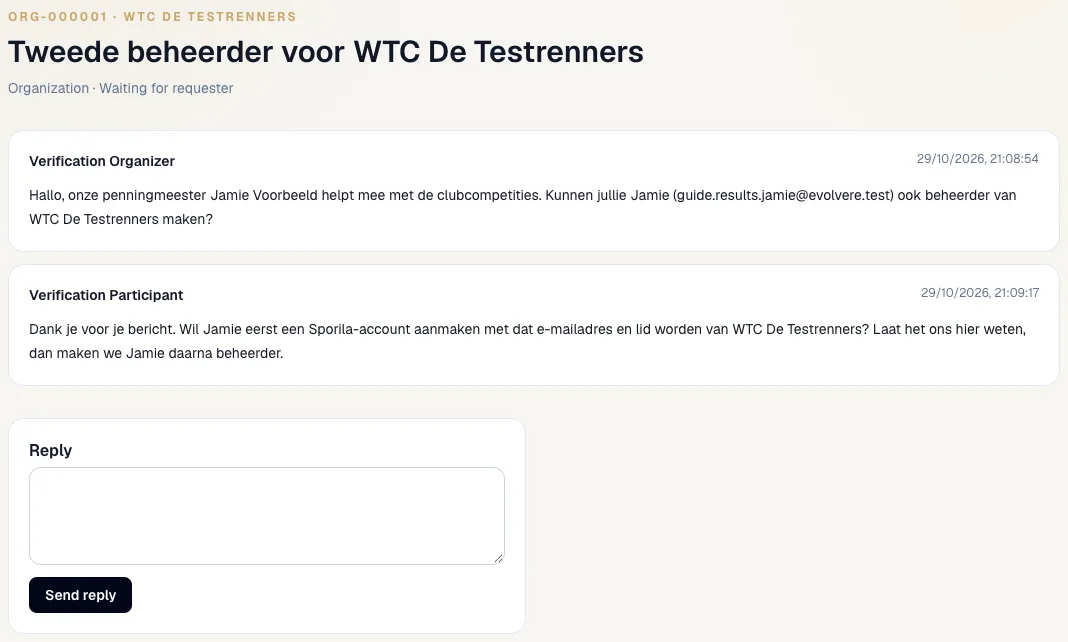
The screenshots show a fictional ticket from the fictional organization WTC De Testrenners. The conversation was typed in Dutch and is therefore shown as written in both languages.
Who can use Support?
‘Support’ appears at the top once you administer an organization. If you only organize a personal competition, or you play as a participant, e-mail support@sporila.com. As a participant with a question about your competition’s rules or entry fee, ask your organizer first.
Open a new ticket
Choose ‘Support’ at the top. Under ‘New support ticket’ choose the organization your question is about and a category: Technical issue, Access, Organization, Fantasy, Payment or Other. Give a short subject and describe under ‘How can we help?’ what you want or what goes wrong: which competition, what you did and what you saw. Then choose ‘Send ticket’.
Find your tickets
‘Tickets’ lists every ticket of your organization with a number, such as ORG-000001. The letters stand for the category. You also see the number of messages and the status. Other administrators of the same organization see the same tickets and can join the conversation.

What the status means
Sporila sets the status, so you see at a glance whose turn it is:
Open
Your ticket has been sent and is waiting for a first response.
In progress
Sporila is working on your question.
Waiting for requester
Sporila is waiting for your reply or action. Open the ticket and respond.
Closed
The question is resolved. You can no longer reply; if something is left, open a new ticket.
Read the reply and respond
Open a ticket to see the whole conversation, with a name, date and time on every message. Type your response under ‘Reply’ and choose ‘Send reply’. You get no e-mail about a new reply, so check Support yourself, especially when it says ‘Waiting for requester’.
What to use Support for
For example an extra administrator for your organization, closing your organization, a result that is not processed, a status step taken too early, or a sign-in or access problem for your members. Always name the competition when your question is about one.
A question for Sporila?
Open Support, choose your organization and a category and describe your question. Then check back regularly for a reply.
Go to SupportHaving trouble?
I do not see ‘Support’ in the menu
Support is for organization administrators. If you are not one, e-mail support@sporila.com.
I cannot send the ticket
The subject needs at least 5 characters and the message at least 10. Also choose an organization and a category.
I can no longer reply to my ticket
The ticket is closed. Open a new ticket and mention the old number, for example ORG-000001.
I get no e-mail about a reply
That is right: Support does not send e-mails yet. Open Support to see whether there is a reply.
My organization was deactivated
Your tickets stay available. In a new ticket, your organization’s name shows ‘deactivated’.
Not an organization administrator? E-mail support@sporila.com.