In short
- During the season Sporila processes results automatically; follow it on the ‘Live’ tab.
- After the last deadline choose ‘Lock’ and then ‘Start scoring’; no step can be undone.
- Finalize the competition once every result is in, then archive or duplicate it.
The screenshots show a fictional cycling competition with invented participants, after one processed stage. The steps are the same for every sport. No status step can be undone, so read what each one does first.
During the season there is little to do
Deadlines lock teams by themselves: at the start of the race, per race weekend, per Phase or per meeting. Sporila publishes the official results and turns them into points automatically, corrected results included. Your competition can therefore stay ‘Open for teams’ all season. Only take the status steps below once everything is over.
Follow processing on the Live tab
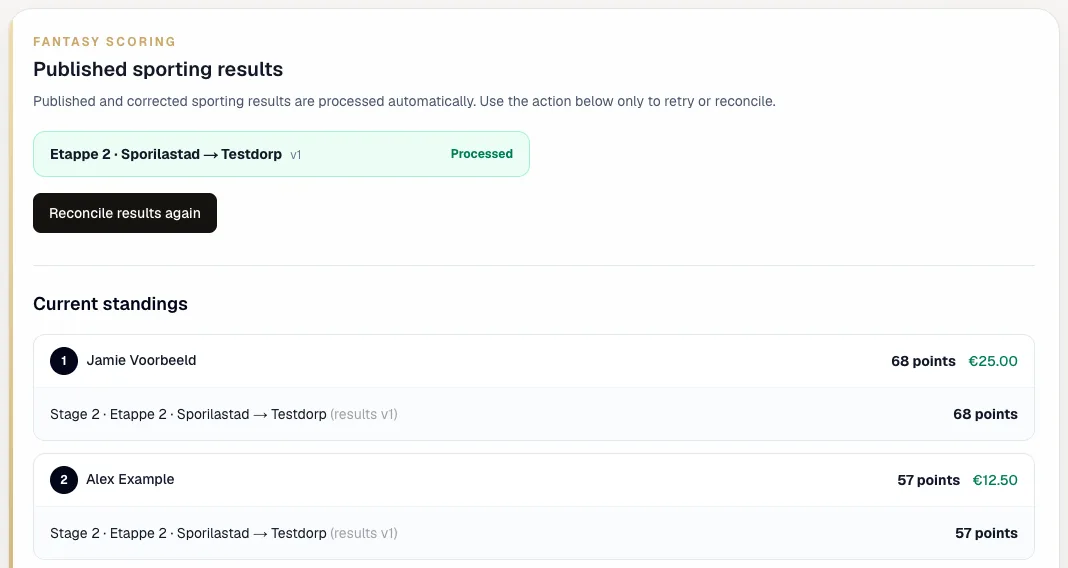
In competition management, open the ‘Live’ tab. ‘Published sporting results’ lists every result with its version and ‘Processed’ or ‘Automatic processing pending’. If a result is waiting, ‘Retry pending processing’ starts it. ‘Reconcile results again’ recalculates everything; you only need it when a ranking looks wrong. Below is the current ranking with points, prize money and points per round.
The status steps
Next to your competition’s status is always the button for the next step. Each step asks for confirmation first and cannot be undone afterwards:
Lock → Teams locked
Nobody can save or change their team any more, not even for a next race weekend, Phase or transfer. Only do this after the last deadline of the whole competition. Results keep being processed afterwards.
Start scoring → Scoring
Signals that every team is in and you are waiting for the last results. Processing itself does not change; it was already automatic.
Finalize → Final
Locks points and prizes. After that no more results are processed and you can no longer change the prize money. For cycling, speed skating, swimming and football, achievements are awarded at this point too.
Archive → Archived
For participants the competition moves to ‘Previous competitions’ under ‘Competitions’. They can still view the standings and their points.
Lock the competition after the last deadline
Choose ‘Lock’ once the last deadline has passed and nobody needs to pick anything else. The status becomes ‘Teams locked’ and the button changes to ‘Start scoring’. If you only want to stop new participants, do not lock; deactivate the competition code instead.

Start scoring
‘Start scoring’ gives the competition the status ‘Scoring’. Leave it there until the last race, heat, meeting or match is over and every result is processed.

Finalize the competition
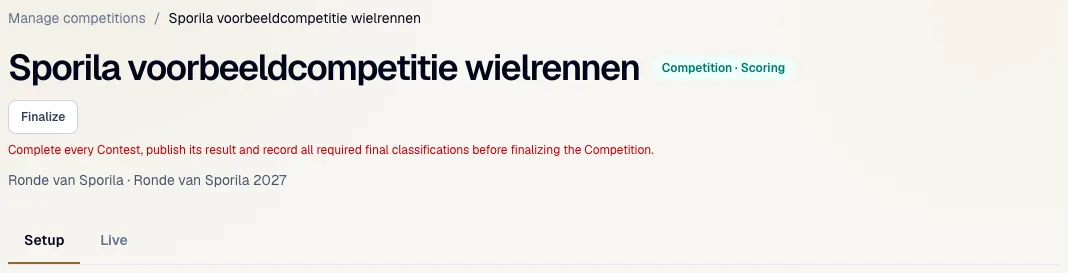
‘Finalize’ only works once every contest is complete with a published result; cancelled contests do not count. Cycling also needs the general, points and mountains final classifications recorded. If anything is missing you see a message and nothing changes. If points are still being processed, retry them on the Live tab first. Sporila does not pay out prizes: once finalized, transfer the prize money to the winners yourself.
Archive the competition
Once everything is settled, choose ‘Archive’. For participants the competition moves to ‘Previous competitions’, which keeps their list of running competitions tidy.
Duplicate for a new edition
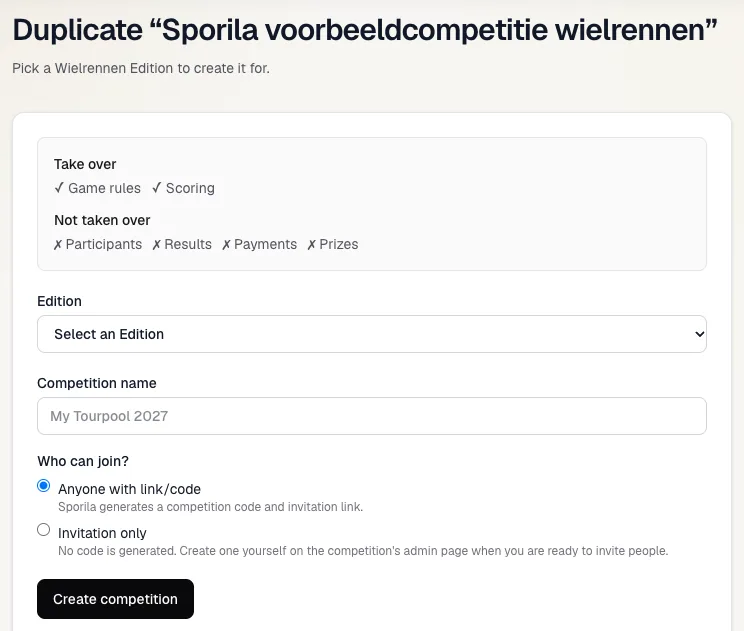
Want to run it again next year? On the ‘Setup’ tab choose ‘Duplicate this competition for a new edition’. The game rules and scoring are taken over; participants, results, payments, prizes and subgroups are not. Choose the edition, a name and who can join. The copy starts as a draft: check its settings, publish the rules and invite your participants again.
Finish setup, as for a new competition
Ready for the finish?
Follow the Live tab during the season. After the last deadline take the status steps in order, finalize once every result is in and duplicate the competition for next year.
Go to competition managementHaving trouble?
‘Finalize’ shows a message
A result or required final classification is still missing, or points are still being processed. Check on the Live tab which result is pending and retry processing. Otherwise wait until Sporila has published the last result.
A result stays on ‘Automatic processing pending’
Choose ‘Retry pending processing’. If it still does not work, open a ticket through ‘Support’ if you manage an organization, or otherwise e-mail support@sporila.com, with your competition’s name and the result.
I locked too early
You cannot undo a status step yourself. If you manage an organization, open a ticket through ‘Support’; otherwise e-mail support@sporila.com, with your competition’s name; until then your participants cannot change their teams.
Do I need to change the status to get points?
No. Results are processed automatically as long as the competition is not final, also while it is ‘Open for teams’.
A result was corrected after I finalized
After ‘Finalize’, points and prizes are locked; later corrections no longer change the standings. So only finalize once the results are truly settled.
Can I bring my participants to the new edition?
No, participants do not carry over to a duplicate. Share the new code or invitation link and they join again.